

Categories

Run 3

fugiman

5/5 - (14506 votes)

About Run 3

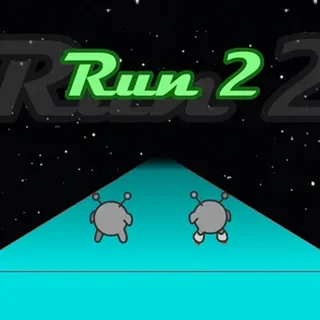
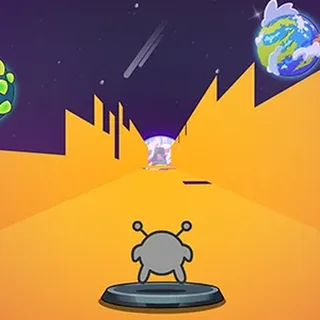
Run 3 is a tunnel-running platformer where you sprint through endless 3D space corridors that twist, fork, fragment, and rotate. Walls become floors, floors become ceilings — gravity is a suggestion. As long as you keep moving forward, the tunnel keeps generating, and as long as you do not fall into the void, the run continues.

Released in 2014 by indie developer Joseph Cloutier (a.k.a. Player_03), Run 3 is the third and most popular entry in the Run series — a franchise that quietly became one of the defining free browser games of the 2010s and remains one of the most-played titles on coolmathgames.com and unblocked-game portals to this day.

You can play Run 3 free online right here, no download, no sign-up. The game runs in HTML5 (a Ruffle-powered web build of the original Flash) in any modern browser — desktop, laptop, Chromebook, tablet, or phone. Click play and you are sprinting through space in seconds.

Key Features of Run 3

  • Gravity-Defying Movement: Walls become floors mid-jump. Every surface is walkable as long as your character lands on it.
  • 300+ Hand-Designed Levels: Explore Mode contains hundreds of unique, story-driven tunnel levels — each with its own layout and challenge.
  • Infinite Mode: Endless procedurally generated tunnels for high-score chasing once you have mastered the controls.
  • 10+ Unlockable Characters: Unlock Skater, Lizard, Pastafarian, Duplicator, and more — each with unique movement quirks (longer jumps, mid-air slow-fall, etc.).
  • Story Mode: A subtle but real narrative unfolds as you explore deeper into the alien tunnel system. Cutscenes give context to the journey.
  • No Downloads, No Plugins: Runs natively in your browser via HTML5. No Flash, no plugins, no installation.
  • Original Soundtrack: The full Run 3 soundtrack by Player_03 — instantly recognizable to anyone who played the game during peak Flash era.
  • Keyboard-Only Controls: Two keys: arrow keys to move, spacebar to jump. Easy to learn, deep to master.

How to Play Run 3

Learning how to play Run 3 takes only a couple of minutes:

  1. Click Play: The game loads instantly in your browser. Choose Explore Mode (story-driven levels) or Infinite Mode (high-score endless run).
  2. Run Forward Automatically: Your character sprints forward continuously. You cannot stop — momentum is the entire premise.
  3. Steer Left and Right: Use Left/Right arrow keys (or A/D) to strafe sideways. You can also slide onto adjacent walls this way.
  4. Jump Over Gaps: Press Spacebar (or Up arrow) to jump. Timing matters — gaps in the tunnel come fast and require precise jump windows.
  5. Use Walls as Floors: When you jump or strafe onto a side wall, gravity rotates and that wall becomes your new floor. This is the core skill — wall-running across the entire tunnel.
  6. Avoid Falling Into Space: If you step or fall off the tunnel into the void, the run ends and you restart the level. In Infinite Mode, you start over from zero.
  7. Unlock Characters: Each character has unique abilities — Skater is faster, Lizard climbs walls slower but more controllably, Duplicator clones itself. Try them all.
Run 3 Controls

ActionKey / Input
Move LeftLeft Arrow ← or A
Move RightRight Arrow → or D
JumpSpacebar or Up Arrow ↑ or W
PauseP or Esc
Menu / RestartClick the menu icon in the level
FullscreenClick the Fullscreen button below the game

Run 3 Tips & Pro Strategy

  • Learn the Wall-Run: The biggest skill jump in Run 3 is realizing every wall is a floor. Practice jumping onto side walls deliberately — it unlocks routes that look impossible from your starting floor.
  • Use Skater for Speed Runs: Skater is the fastest unlocked character. Once you have Skater, replay early levels for time-attack scores — and clear new tunnels faster.
  • Try the Lizard for Tough Levels: Lizard climbs walls slower than the default character. For tunnels with razor-thin platforms, Lizard’s controlled climb is forgiving.
  • Memorize Tunnel Patterns: Explore Mode levels are fixed layouts. Dying teaches you the pattern; second attempts clear most levels within 2–3 retries.
  • Aim for Power Cells: Power Cells scattered in Explore Mode unlock bonus content and characters. Detour to grab them when the run is going well — skip them when survival is at stake.
  • Infinite Mode is About Rhythm: Unlike Explore Mode’s memorize-and-execute style, Infinite is reaction-only. Find a steady "left-jump-right" tap rhythm to handle most pattern variations.
  • Headphones Recommended: Audio cues — the wall-rotation thud, the jump woosh — give microsecond warnings that help with precision platforming.
  • Save Frustrating Levels for Later: If one level is killing you, move on to the next branch and return later. Newly unlocked characters often make the stuck level trivial.

Why Run 3 Is Still Played in 2026

Run 3 has been continuously played for over a decade because it nails a specific feel — gravity-defying flow state — that almost no other game replicates. The act of jumping from a floor onto a side wall mid-corridor, having gravity instantly reorient, and continuing the run on what was just a vertical surface, is uniquely satisfying.

It is also one of the rare browser games with serious design depth. The Explore Mode is a hand-crafted single-player campaign with 300+ levels, a subtle alien-explorer narrative, and character abilities that meaningfully change how you approach each tunnel. This is not a 5-minute coffee-break game — players sink dozens of hours into completing all branches.

For school and workplace browsers where most games are blocked, Run 3 has been a perennial unblocked staple. It runs in HTML5 with no plugins, uses minimal CPU, and even works on locked-down Chromebooks. Cool Math Games featured Run 3 as one of its top titles for years.

Run 3 Developer & History

Run 3 was released in April 2014 by independent developer Joseph Cloutier, known online as Player_03. It was the third game in the Run series — preceded by Run (2008) and Run 2 (2011) — but Run 3 was the entry that broke through to mainstream browser-game audiences via Kongregate and coolmathgames.com.

The game was originally built in Flash but was converted to HTML5 after Flash’s end-of-life in 2020, ensuring it remained playable in modern browsers. The HTML5 port preserved all original mechanics, levels, character unlocks, and soundtrack — players who first played in 2014 can pick it up in 2026 and the experience is identical.

Run 3 is a frequently cited entry in retrospectives about peak Flash-era browser gaming, alongside titles like Stick Run, Tank Trouble, and Bloons TD. Its longevity — over a decade of consistent play — is rare in the casual gaming space.

Frequently Asked Questions

What is Run 3?

Run 3 is a free browser-based platformer where you sprint through endless 3D space tunnels, leaping over gaps and running on walls as gravity rotates. Released in 2014 by indie developer Joseph Cloutier, it is the third game in the Run series and one of the most-played free games on Cool Math Games and unblocked-game portals.

Is Run 3 free to play?

Yes. Run 3 is 100% free to play in your browser at run3.us.com. There is no download, no account, no payment. The HTML5 version loads instantly and works on any modern device.

How do you play Run 3?

Your character automatically runs forward. Use Left/Right arrow keys to strafe sideways and Spacebar to jump. Jump or strafe onto a side wall and gravity rotates so that wall becomes your floor. Avoid falling into the void between tunnel sections. Reach the end of each tunnel to complete the level.

What are the controls for Run 3?

Left/Right arrows (or A/D) to move sideways. Spacebar (or Up arrow) to jump. P to pause. That is it — Run 3 uses three keys total. The depth is in how you combine sideways movement, jumps, and wall transitions.

Can I play Run 3 unblocked at school?

Yes. Run 3 runs entirely in your browser at run3.us.com with no plugins or downloads. The HTML5 version uses standard HTTPS and passes most school content filters, including those that block Flash-era game sites.

How many levels are in Run 3?

Run 3 contains over 300 hand-designed levels across Explore Mode, plus an Infinite Mode for endless high-score chasing. Explore Mode is divided into multiple branching tunnel paths with hidden levels and Power Cell collectibles.

How do you unlock characters in Run 3?

Most characters unlock by collecting Power Cells in specific Explore Mode levels or by completing hidden levels. Skater unlocks early; Lizard, Pastafarian, Duplicator, and others unlock as you progress deeper into the tunnel system. Each character has a unique movement ability.

What is the difference between Explore Mode and Infinite Mode in Run 3?

Explore Mode is a structured single-player campaign with 300+ hand-designed levels, a subtle alien-explorer narrative, and Power Cell unlocks. Infinite Mode is an endless high-score procedural run — no end, no story, just survive as long as possible.

Does Run 3 work on mobile?

Run 3 was designed for keyboard input and works best on desktop and laptop. The HTML5 build offers basic touch controls on phones and tablets but the experience is meaningfully better with a real keyboard. Chromebook with keyboard works perfectly.

Who made Run 3?

Run 3 was developed by Joseph Cloutier, an independent game developer known online as Player_03. Released in April 2014 on Kongregate, it became a long-term staple on coolmathgames.com and unblocked-game portals.

Why does my character wall-run in Run 3?

When you jump or strafe onto a side wall in Run 3, gravity rotates and that wall becomes your new floor. This is a core mechanic, not a bug — almost every tunnel level requires using side walls as floors at some point. It is the game’s signature feature.

How do I beat Run 3?

There is no single end-state — Run 3 has 300+ Explore Mode levels and an endless Infinite Mode. "Beating" Run 3 typically means completing all main story tunnels and unlocking every playable character. Even then, Infinite Mode high scores can be chased indefinitely.

Can I save my progress in Run 3?

Yes. Run 3 saves your level progress, character unlocks, and Power Cells in your browser’s local storage. Do not clear site data for run3.us.com or your save will reset.

Is Run 3 the same as Run 2 or Run 1?

No. Run 3 is the third entry in the Run series, with significantly upgraded visuals, more characters, longer Explore Mode, and improved level design compared to Run (2008) and Run 2 (2011). Most players agree Run 3 is the best entry in the series.

Was Run 3 originally a Flash game?

Yes. Run 3 was built in Flash when it launched in 2014. After Flash’s end-of-life in December 2020, the game was converted to HTML5 so it could continue running in modern browsers without plugins. All original mechanics and content are preserved.

How do you get Power Cells in Run 3?

Power Cells appear in specific Explore Mode levels, often hidden on side walls or in branching paths. Some levels are exclusively Power Cell challenges. Collecting Power Cells unlocks new characters and reveals hidden levels in the tunnel map.

Are there cheats for Run 3?

There are no official cheat codes. The challenge is built around honest platforming skill. Browser-side hacks exist but they corrupt the save file and disable character-unlock achievements.